Posts

Showing posts with the label Microsoft

System.Messaging.MessageQueueException (0x80004005): A workgroup installation computer does not support the operation (Public Queue create issue)

This is a weird issue that I don't fully understand why it would happen. But the symptoms are very persistent as we're able to reproduce these behavior easily. Issue: The MSMQ (Microsoft Message Queuing) fails to create Public Queues and throws  "the System.Messaging.MessageQueueException (0x80004005): A workgroup installation computer does not support the operation" exception.
Excel - Merge Tables with Index and Match Formulas

Image
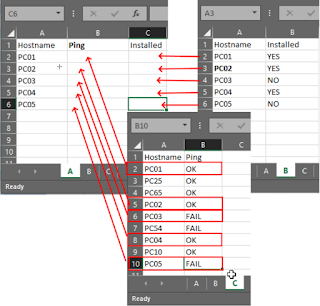
A lot of the times, I find myself having multiple Excel or CSV files with different tables & data that at some point, I need to merge them... Here is a not to myself! Use Index and Match formulas. Index Function The INDEX function returns a value or the reference to a value from within a table or range. Match Function The MATCH function searches for a specified item in a range of cells, and then returns the relative position of that item in the range. For example, if the range A1:A3 contains the values 5, 25, and 38, then the formula =MATCH(25,A1:A3,0) returns the number 2, because 25 is the second item in the range. Ex : INDEX ( return_range , MATCH ( lookup_value ,  lookup_range , 0)) =INDEX(Sheet1!$B$2:$B$218,MATCH($A2,Sheet1!$A$2:$A$218,0)) In this example, with Match, we're trying to find cell A2's exact value by looking in the "Sheet1", from A2 to A218. When the exact value of A2 is found in the range of Sheet1!$A$2:$A$218, with the Index ...

Veeam Backup Error : Failed to prepare guest for hot backup. Error: VSSControl

Image
Problem Description; I had this issue on one of my backup jobs recently and I was able to fix the issue with the solution explained below. After a quick google search, I realized that I'm not the only one and neither you are :) Full Error Description; Failed to prepare guest for hot backup. Error: VSSControl: Failed to prepare guest for freeze, wait tim eout 9 00 sec Error: VSSControl: Failed to prepare guest for freeze, wait timeout 900 sec

Windows 10 Sysprep Error

Almost all of the obvious bugs and errors are all related to Microsoft new environment and the APPs... Recently, I was trying to prepare a VM Template but I was stuck at the Sysprep process with the following error.

HOW TO IMPORT / EXPORT ActiveDirectory User List with Properties (French Characters – UTF8)

HOW TO IMPORT / EXPORT ActiveDirectory User List with Properties (French Characters – UTF8)   1- Export Users to a CSV file from an OU with the following command. (Don’t forget to “import-module ActiveDirectory” when you start PowerShell) Get-ADUser -Filter * -SearchBase "OU=Administrateurs Systeme,OU=Utilisateurs,dc=domain,dc=com" -properties * | Export-Csv C:\AdminSysteme.csv -Encoding UTF8

Windows Update 80070000E Error

If you're getting a 80070000E issue when trying to update a Windows 7 follow the steps below to solve the issue.

WDS, PXE Boot, DHCP and VLANs… How to manage?

I’m a big fan of easy deployment, scripting, automating etc… Therefore I love deployment tools. I am constantly using tools like Microsoft System Center, WDS, MDT, etc… Thanks to these kinds of tools, I can be alone and have the workforce of an IT army :)

WDS Import-WDSInstallImage Overview - Tips

Image
I am studying for an upcoming Microsoft exam #70-411 and I was practicing the new WDS (Windows Deployment Services) features in the Windows Server 2012 R2 and I ran into a little problem.

VMWare Workstation "Not Enough Physical Memory..." Issue after Windows Updates on Windows 8.1

Image
Yep... Another update and another bug. I just applied this months updates on my computer at home and guess what? It caused almost a "fatal" error on my VMWare Workstation virtual machines! As soon as my computer boots, I tried to fire one of my vms and I got the following scary message.

Windows 8 Sysprep Issues - Fatal Error

Altough it's been a while that Windows 8 is out on the market, I never had to play around with the Windows 8 images and syspreps as I had to with Windows 7. I decided to prepare me a nice updated image of Windows 8 in a vm and sysprep it and use it as template for my lab environment. The plan is simple...

Dell Venue 8 Pro & Wifi Connection Issues

I am an owner of the Dell Venue 8 Pro since it has been out and to be honest, for a device that I only paid $299, I am extremely happy about it. It's not a powerful device where I can use it as a replacement of my laptop or my desktop... Not even close! But...

Microsoft Outlook 2010 Auto-Complete Restore

Recently, one of my users lost all his auto-complete list from his mailbox! For me, this is no big deal as I barely send emails but for our employees who sends / receives hundreds of emails per day, it's a pretty big deal and a very practical feature to have. Outlook will create a little database of the email addresses that you send or receive emails from into a file generically called "Auto-Complete". In the previous versions of the Microsoft Office suite, this file was the famous "NK2" file.

Deleting & Recreating an Active Directory User Account and an Exchange 2010 Mailbox

One of our users was having bizarre problems with her account. We tried to troubleshoot to find out what was causing the real issue but nothing was clear. Before I even tell you what the reason was, let me tell you first what the symptoms were. First user reports that she has a warning when she logs onto her computer.   I confirmed that she was getting a Windows 7 balloon warning “ Windows cannot locate the server copy of your roaming profile ”. When you browse Event Viewer , Windows Logs\Application , you should see another error with the error ID 1521 with a description “Windows cannot locate the server copy of your roaming profile and is attempting to log you on with your local profile. Changes to the profile will not be copied to the server when you log off. This error may be caused by network problems or insufficient security rights.” Just these 2 symptoms were indicating a Roaming Profile issue, which makes sense because the user is part of an OU, which roaming...

Best Practices for Anti-Virus Configuration and Exclusions in a Windows Environment

Image
If you are here, it means you already know that configuring an anti-virus is not as simple as « next, next, next, ok ». Especially, deploying an antivirus to hundreds of clients… You’ve got to make sure that your clients are not suffering from intrusive antivirus processes, setup exclusions properly so that you don’t scan gigabytes of ISO files, make sure that the clients get the most recent and proper updates even if they are not connected to your network… Do you now get what I mean? J I went through this process recently. We’re using Trend-Micro Worry-Free Advanced Business security software for a couple of years now. Recently Trend-Micro had an update and the most recent version of the program is version 8 as of writing this article. The process of upgrading didn’t go very well so I had to reinstall it from scratch! Here are my notes regarding this project; I am not an antivirus expert but I guess every antivirus product has their own installing and “best practices...

Share a Custom Calendar in Outlook

Image
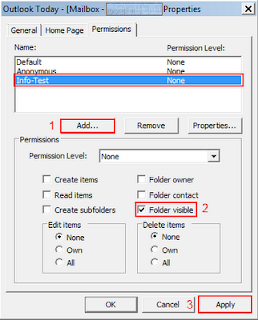
The default   Calendar   folder in Outlook is created in each Outlook profile. This folder cannot be renamed or deleted. You can create additional calendar folders and these folders can be renamed or deleted. This section includes instructions to share calendar folders that you create. While all these procedures were written based on Microsoft Outlook 2003, they can also be applied to a Microsoft Outlook 2007 or 2010 as the procedures are close enough to use a single guide.    1-  Open Microsoft Outlook 2003 , right click on your “ Mailbox ” and choose “ Properties for Mailbox - …. ” . This will bring the dialog box for “ Outlook Today – [Mailbox – Your Name] Properties ” 2-      Under Permissions tab, click on Add… button and choose the groups or users that you want to give them access to your calendar. Once the users are added to the list, click on the user to highlight it and under permissions, check the Folder Visible checkbox. ...

WMI Filtering, Targeting, Usage & Utilities

WMI filtering is a very neat tool. I personally find its syntax a little complicated. Recently I came across with this 2 line article. How to WMI Filter with computer name. Here is an example. select * from Win32_ComputerSystem where Name = ‘Computer Name’ If you are looking for more WMI Filter examples, this article has it all… http://blog.enx1.com/2011/07/03/wmi-gpo-filters-for-operating-system-types/ Here is another example of how to target Windows 7 by its architecture type (X86 or X64). This is great while deploying applications through Group Policy. Not all the applications are compatible both 32 and 64 bit, so you can target only 32bit or only 64bit computers with the help of this WMI query. Here is how it looks like to target only Windows 7 X86 Systems select * from Win32_OperatingSystem WHERE Version like "6.1%" AND ProductType="1" AND NOT OSArchitecture = "64-bit" Targeting Windows 7 X64 Systems select * from Win32_Operatin...